Give the story somewhere to happen
Build the location.
Use every angle.
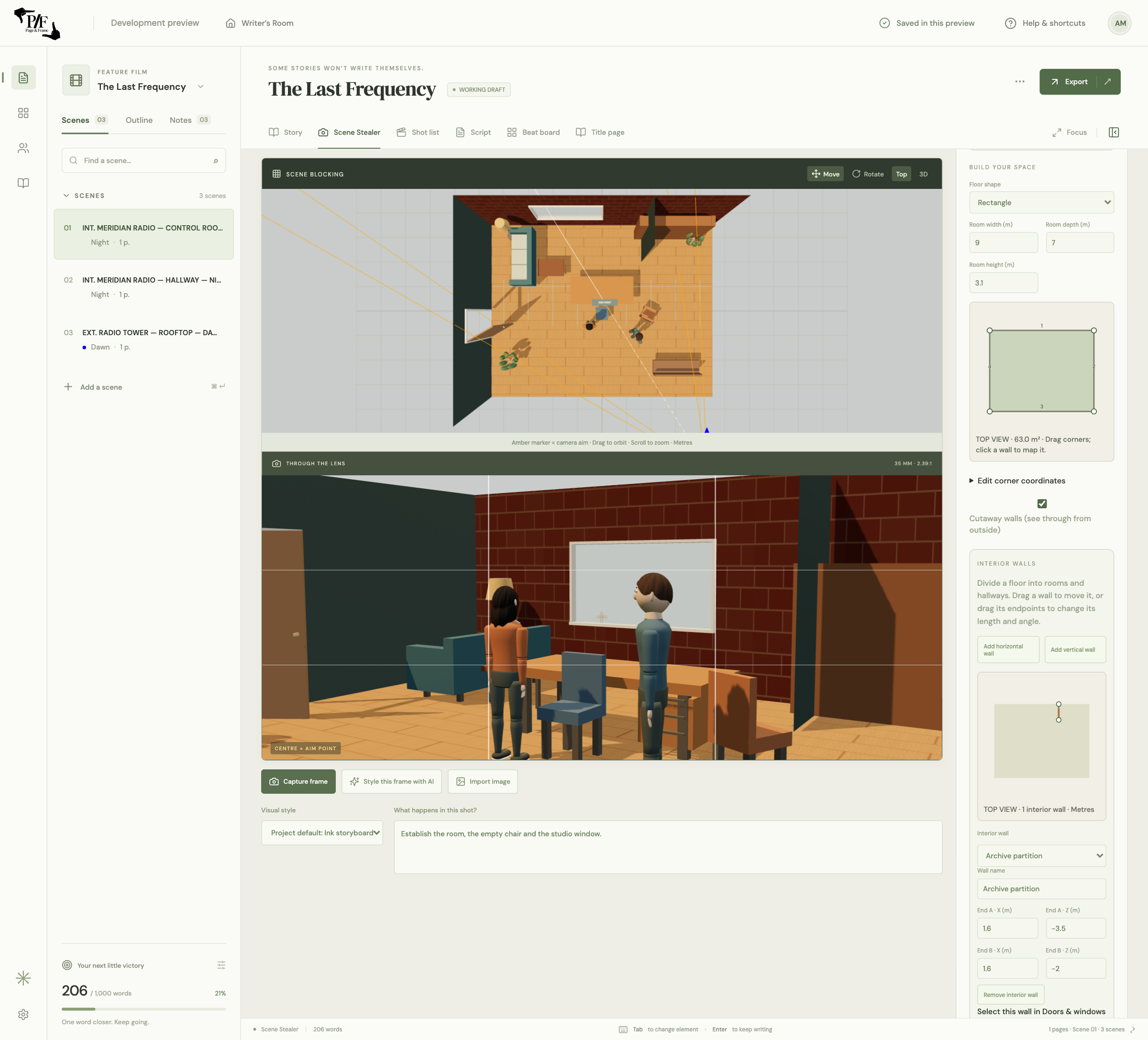
Page & Frame’s set workshop lets filmmakers build reusable 3D locations for storyboards and camera blocking. Shape the room, add interior walls and openings, dress it with props, then choose the set from your screenplay scene.
Apple Silicon Mac launch in preparation · Public sales not open yet
- Custom floor plans
- Doors, windows & materials
- Reusable scene sets
Start with a space that makes sense.
Before decorating a set, decide where people enter, what they can see and how they move through it. Build a custom room outline, add interior walls to divide a larger space, and create rooms or hallways. Workshop starting sets can give you a base to adapt. Use the plan to test practical story questions: can the character see the doorway from this chair, is there room for an over-the-shoulder view, and where would the second actor stand?
Put the openings and surfaces to work.
Place doors and windows on the relevant walls, position and resize them, and use their opening state to explore the scene. Choose built-in floor and wall materials for an early blocking pass. When a real location matters, manually map your own photographs to the appropriate surfaces: floor to floor, wall to wall. Reference textures can help communicate a room’s character without making every item photorealistic. This is manual set geometry and texture placement, not automatic room reconstruction from a photo.
Dress for the action, not just the background.
A desk can separate two people; a chair can block an exit; a street prop can obstruct an important eyeline. Place furniture, household objects, plants, vehicles and exterior dressing with the action in mind. Supported self-contained GLB imports let you bring suitable models into the plan as well. Check scale and contact in the camera view: an object that looks fine in a floor plan may cover an actor’s face or appear to float in a low angle.
Save the set once, then plan the coverage.
Store a custom layout as a reusable set, retaining its walls, openings, textures and dressing. Choose it from a screenplay scene or use it as a starting point for a shot. Existing shots retain their own set copies, so updating the library does not silently rewrite earlier captured coverage. That separation is useful when a later scene uses the same location after the furniture has moved. Keep a clearly named library version for each important layout.
Is this architectural CAD or a construction plan?
No. The workshop is a visual film-planning tool for locations, blocking and camera decisions. It does not certify structural design, building-code compliance, surveying accuracy or construction measurements. Use qualified tools and professionals for those purposes.
The whole creative workspace
Write it. Build it.
See it.
Page & Frame brings screenplay writing, story planning, reusable 3D sets and visual shot planning together.
US$69.99 launch · US$99.99 planned regular · plus applicable tax
Planned one-time purchase for one computer. Lifetime use of the purchased major version and its updates; future major upgrades may cost extra. Apple Silicon Mac/macOS 13+ first. Windows and Intel Mac downloads are not offered at launch.
Join the launch list ↗