Find the frame before the shoot
Stage the moment.
Keep the frame.
Scene Stealer is Page & Frame’s integrated 3D storyboarding workspace. Build a location, stage the action and capture a camera frame when the composition works. Your saved shots stay connected to the screenplay scene.
Apple Silicon Mac launch in preparation · Public sales not open yet
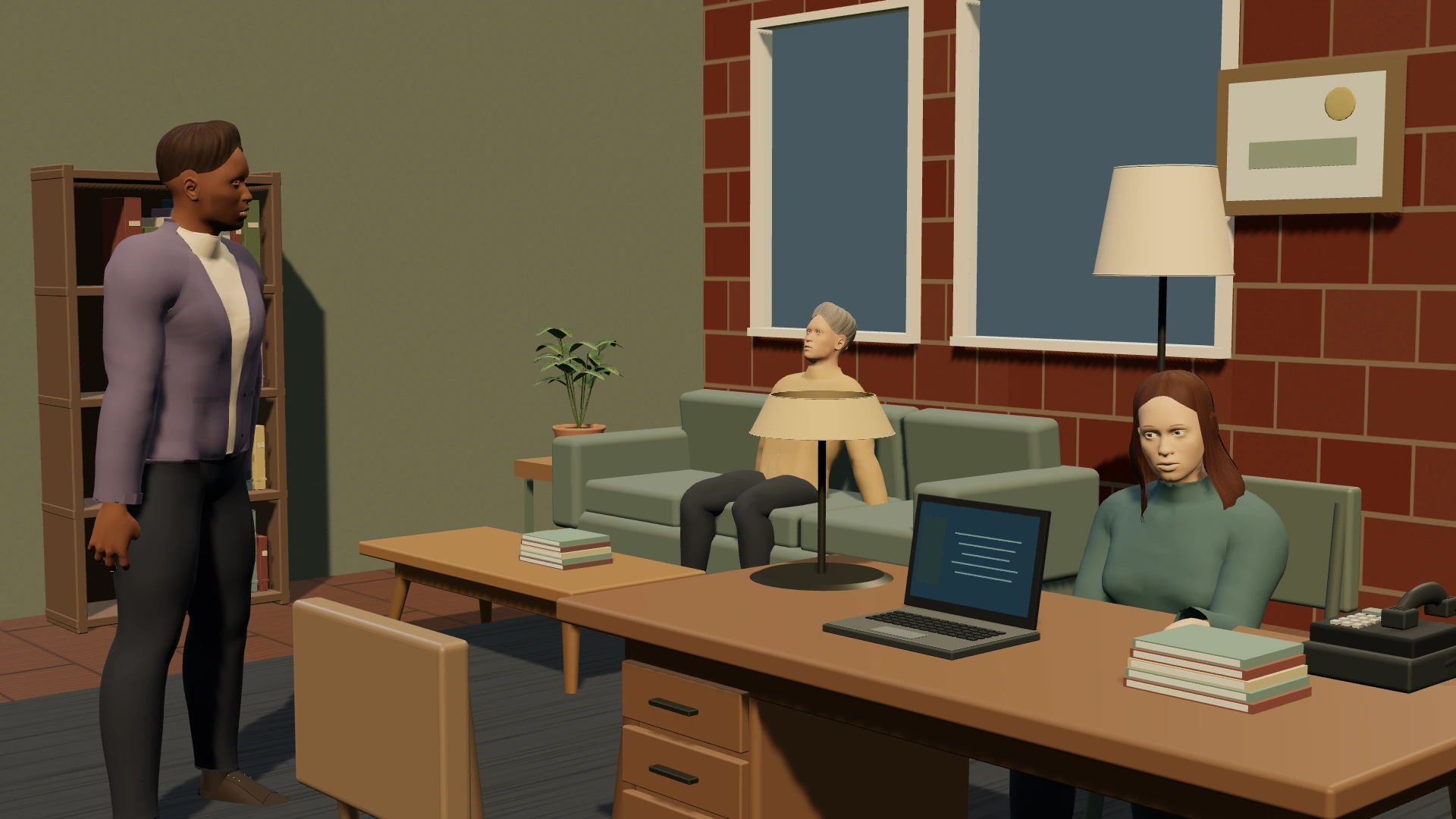
- Stage actors & props
- Capture camera frames
- Storyboard PDF & animatics
You do not have to draw every angle.
A storyboard communicates what the audience sees: who is in frame, where they are looking, what moves and what changes. In Scene Stealer you can explore those decisions by positioning stylized actors, choosing poses and expressions, dressing the set and moving the camera. Start with a readable wide shot, then test a closer angle without redrawing the location. A 3D frame is a planning reference, not a claim that the final film will look exactly like the preview.
Build the shot before you capture it.
Set construction and shot capture are separate steps. Choose or build a location, add characters and objects, and adjust the blocking. Use the setup view to understand the space and the through-the-lens view to judge composition. Change camera position, aim point, focal length and aspect ratio. Capture the shot intentionally once the staging is ready, then organize the saved coverage. A saved camera frame gives the shot list a visual reference as well as a written description.
Keep references close to the screenplay.
Shots belong to the scenes they cover, so the visual plan has context. A doorway reaction, for example, can remain linked to the control-room conversation that motivates it. Add descriptions, movement, timing and notes to communicate the purpose of each frame. You can also import reference images. Optional own-key image generation offers pencil, ink, photoreal, comic, watercolour and custom directions; provider costs and connected processing apply only when you request that workflow.
Share a sequence people can follow.
Export storyboard PDFs on Letter or A4 with 2, 4 or 6 frames per page. Preview saved images as an animatic, adjust their durations and export a silent WebM sequence with shot slates and timecode. For the shoot itself, use a visual shot-list layout with saved frame thumbnails, notes and completion checks. Saved-frame animatics do not imply animated 3D camera moves, audio editing, MP4/NLE export or AR capture. Check those requirements if they are central to your production.
Do I need an AI subscription?
No. Core manual storyboarding, 3D staging and local writing work offline. AI image generation is optional and uses your own provider account. Page & Frame is being prepared for an Apple Silicon Mac launch; public downloads and sales are not open yet.
The whole creative workspace
Write it. Build it.
See it.
Page & Frame brings screenplay writing, story planning, reusable 3D sets and visual shot planning together.
US$69.99 launch · US$99.99 planned regular · plus applicable tax
Planned one-time purchase for one computer. Lifetime use of the purchased major version and its updates; future major upgrades may cost extra. Apple Silicon Mac/macOS 13+ first. Windows and Intel Mac downloads are not offered at launch.
Join the launch list ↗