Take the plan onto the set
A shot list you
can actually use.
Page & Frame connects a shot list to its screenplay scenes and saved camera frames. Describe the coverage, choose a printable layout, and take visual references, notes and Done / Reshoot boxes onto the shoot.
Apple Silicon Mac launch in preparation · Public sales not open yet
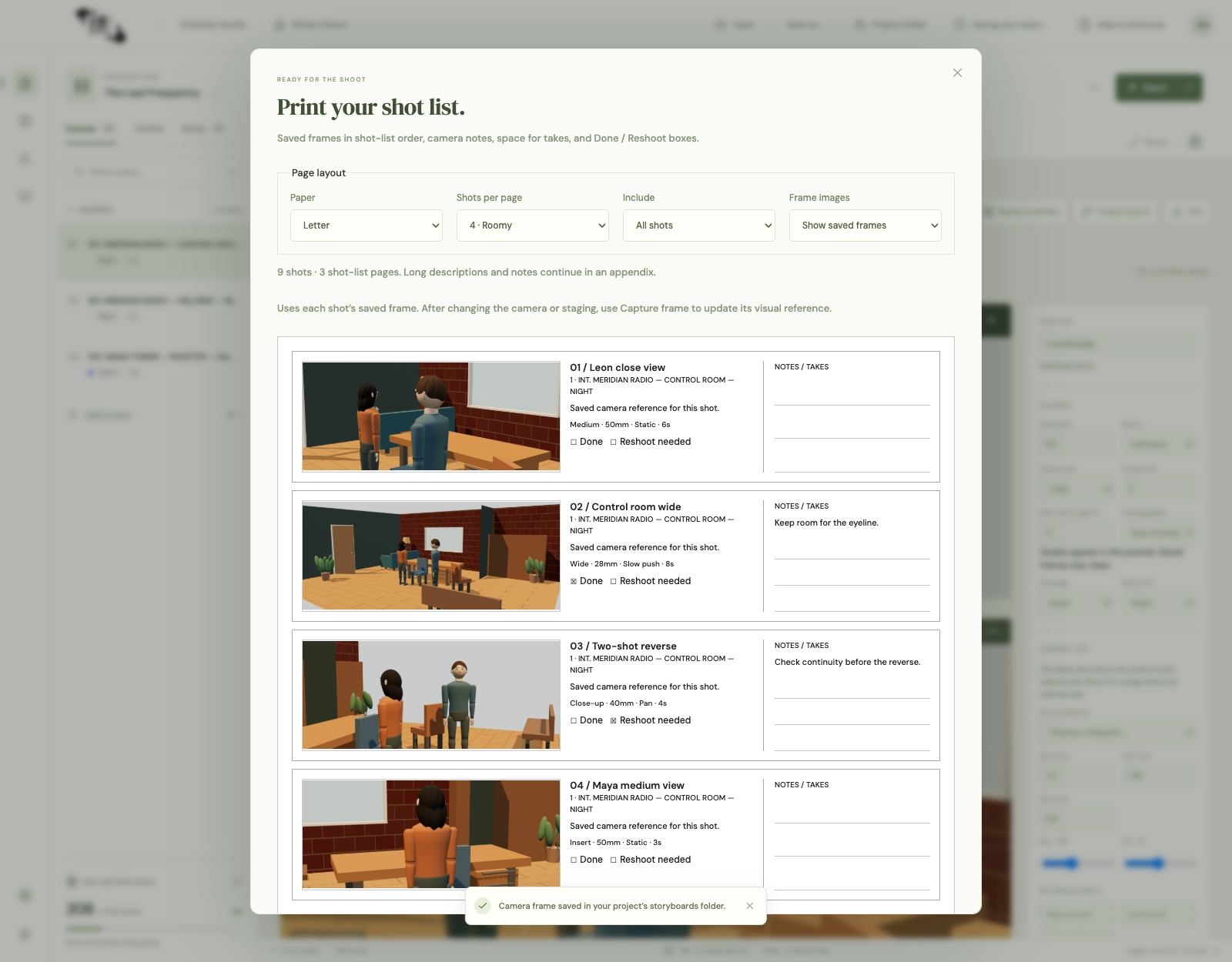
- Saved frame thumbnails
- 4, 6 or 8 shots per page
- Notes & Done / Reshoot checks
Record what makes this shot different.
A useful shot list says more than “close-up.” Identify the scene and shot, describe the action or dramatic purpose, and note shot size, lens, movement and estimated duration where useful. Record sound, continuity or blocking concerns in the notes. Keep descriptions short enough to scan on set. If the plan depends on a specific look or eyeline, attach the saved camera frame so the crew can see what the words mean.
Keep the picture with the plan.
Capture a frame from Scene Stealer after setting the actors, props and camera. The saved image can appear in the printed shot list alongside that shot’s details. Arrange the coverage and review the sequence before printing: a thumbnail is valuable only if it represents the setup you intend to shoot. The list can include a current scene or coverage across the project, while retaining the scene association used in the writing workspace.
Choose a page you can work from.
Print on Letter or A4 with 4, 6 or 8 shots per page. Four gives more space to see the frame and write notes; six balances coverage and legibility; eight keeps a longer sequence compact. Include frame thumbnails or choose a text-only layout. Printed notes space and separate Done / Reshoot boxes support decisions made during the day. Long descriptions continue in an appendix rather than being silently cut away. Preview the output at the paper size you will actually use.
Separate coverage order from shooting logistics.
Story order helps you check that the scene makes sense. Shooting order may instead group camera positions, lighting directions or performances. A shot list supports that conversation; it does not replace a schedule, call sheet or safety plan. In Page & Frame, shot status can be To shoot, Done or Reshoot needed. After the shoot, use your notes to distinguish missing coverage from a creative change. Keep the underlying screenplay and saved visual plan as references for the edit.
Can I try a blank shot-list sheet without the app?
Yes. Our free shot-list worksheet has 4, 6 and 8-shot layouts, frame boxes, notes and Done / Reshoot checks. It opens in your browser and prints without signing up. It is a blank planning aid, not a demonstration of importing your app project.
The whole creative workspace
Write it. Build it.
See it.
Page & Frame brings screenplay writing, story planning, reusable 3D sets and visual shot planning together.
US$69.99 launch · US$99.99 planned regular · plus applicable tax
Planned one-time purchase for one computer. Lifetime use of the purchased major version and its updates; future major upgrades may cost extra. Apple Silicon Mac/macOS 13+ first. Windows and Intel Mac downloads are not offered at launch.
Join the launch list ↗