Screenwriting, with a visual next step
A Final Draft alternative.
A wider creative workspace.
Page & Frame is an independent Final Draft alternative for writers who want to take a screenplay into visual planning. Write the scene, build its location and frame its coverage in one local project. Here is how that workflow compares—and what to check before moving a working draft.
Apple Silicon Mac launch in preparation · Public sales not open yet
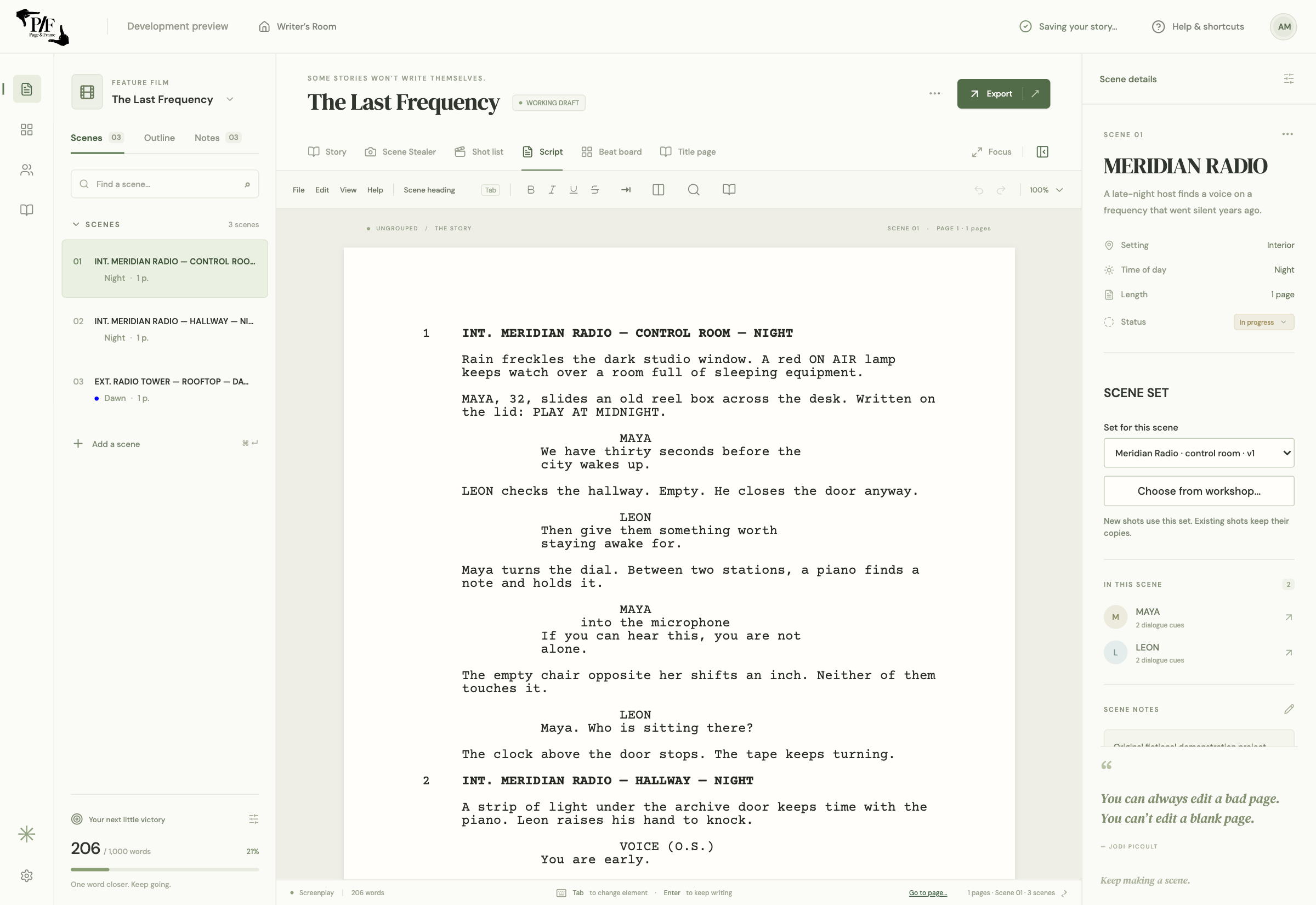
- Offline screenplay writing
- Final Draft .fdx import
- Integrated 3D storyboards
The short version
Who is this for?
Consider Page & Frame if you write and direct your own work, want storyboards alongside the screenplay, and prefer a planned one-time desktop purchase. Keep Final Draft in the conversation if your team requires its native revision workflow, established production tooling or an exact Final Draft handoff. Page & Frame is pre-launch; it is not a claim of complete feature parity.
A practical comparison
Compare the workflow, not just the price.
On a smaller screen, scroll the table sideways to compare the details.
| Your decision | Page & Frame | Final Draft |
|---|---|---|
| Main focus | Screenplay → reusable 3D set → captured shots | Dedicated screenwriting and production tools |
| Writing tools | Screenplay elements, pagination, dual dialogue and title pages | Automatic formatting, outlining and tracked revisions |
| Existing Final Draft files | FDX import; review layout and compatibility report | Native Final Draft workflow |
| Visual planning | Integrated actors, props, cameras and visual shot lists | Beat Board and Outline Editor; different planning tools |
| US pricing checked Nov 6, 2026 | Announced $69.99 launch / $99.99 regular, plus tax | FD13 offer $199.99; list $249.99. Suite annual offer $69.99; list $99.99/year; monthly $16.99 |
| License and availability | Planned one-computer purchase, purchased-major updates; Apple Silicon Mac first | Two-computer activation; Mac and Windows. See vendor plan terms |
Competitor facts checked November 6, 2026 against the vendor’s published information; competitor applications were not tested for this comparison. Offers, features and terms can change. Page & Frame is pre-launch. Sources:
Start with the job you need the software to do.
A writer delivering a revised television episode and a filmmaker preparing a first short can both need a screenplay editor, but their next decisions may be very different. One needs to preserve a production’s agreed draft process. The other may need to work out whether a conversation can be covered in a borrowed office with three available actors. A useful comparison starts with that next task, rather than treating every app as a list of identical checkmarks.
Page & Frame connects the writing to that second kind of visual decision. A scene can lead to a reusable set, a staged cast and saved camera frames. You can return to the dialogue without treating the boards as a completely separate project. Final Draft remains a relevant choice when its writing and production workflow is the requirement. Our comparison is written by Page & Frame’s publisher, Level Up Classroom Inc.; it is not an independent review or a claim that an established production should switch tools without testing.
The screenplay still needs to read like a screenplay.
The connected workflow begins on the page. Page & Frame supports scene headings, action, character cues, dialogue, parentheticals, inline formatting, title pages and dual dialogue. Scene navigation helps you return to the passage you are developing. Those fundamentals matter even if you never build a set: the writing must communicate the scene before a camera angle can clarify it. A visual planning workspace is useful when it supports that work instead of asking you to maintain another copy of the story.
Dual dialogue is a good example of a specific requirement to test. Import a short exchange with simultaneous speakers, inspect the columns, then review the native PDF output. Also check a long speech that breaks across pages and any unusual formatting your project uses. An app can support a feature without reproducing another application’s exact layout choices. We do not promise identical Final Draft page breaks. For an issued production draft, treat page numbering and revision expectations as acceptance criteria, not assumptions.
Bring an FDX file across deliberately.
FDX import is the launch interchange path for an existing Final Draft screenplay. Keep your source file, import a separate working copy and read the compatibility report. Compare the title page, first and last scenes, dialogue, emphasis and any special paragraphs against the source. If the script has production history, locked pages, custom spacing or revision marks, include those in the review before you rely on the imported draft. The file extension alone does not prove that every application interprets every field in the same way.
Continue the new draft as a native Page & Frame project once you have reviewed it. That is the project that connects your screenplay, planning and visual coverage. Full imported revision/version history and a guaranteed edited round trip back into Final Draft are not launch promises. If collaborators must keep editing the same FDX in Final Draft, retain the original and agree on the handoff before changing the working workflow. Our FDX import guide gives you a practical checklist; importing a file is a starting point, not an automatic approval of a production conversion.
Follow the scene into the room.
Imagine a character crossing an office to deliver news that another character does not want to hear. On the page, you decide what changes between them. In the visual workspace, you can decide whether the desk keeps them apart, where the doorway sits and what the listening character can see. Build or choose the location, place the actors and props, then move the camera. Capture a shot when the blocking and composition are ready. A room template does not need to become a finished shot the moment you select it.
Saved frames give a scene’s shot list a concrete visual reference. You can add a purpose, movement, timing and notes, then print a visual shot list with 4, 6 or 8 shots per page. Storyboard PDFs and silent saved-frame animatics provide other ways to share the planned sequence. This is the main reason to consider Page & Frame as a combined writing and filmmaking workspace. It does not turn the app into a full animation package, and it does not mean Final Draft’s outlining tools and a 3D camera do the same job.
Understand the purchase you are comparing.
Page & Frame’s announced launch price is US$69.99 plus applicable tax, with a planned regular price of US$99.99. The planned purchase covers one computer and lifetime use of the purchased major version, including updates to that major version. Future major upgrades may cost extra. Core writing and manual 3D planning work offline; an AI subscription is not required. Optional generation uses your own provider account and may incur separate provider charges. Public sales and downloads are not open yet.
Compare the license, the number of computers and the tools you actually need. A low launch price is not the same thing as a free app, an unlimited-seat license or lifetime access to every future major release. It is also not correct to say that Page & Frame costs less than every Final Draft plan: the vendor currently advertises a discounted annual Suite price equal to our announced launch amount, with different subscription terms. The price table above records the checked offers and links to the vendor so you can review the current conditions.
Keep the production handoff in view.
Before changing tools mid-project, identify who receives the next file. A collaborator reading a PDF, a director discussing boards and a coordinator maintaining an issued draft may each need a different output. Agree on which native project remains the working source and which outputs are references. Keep a dated source copy outside your experiment so that evaluating another application cannot leave the team uncertain about which draft contains the authoritative text.
Page & Frame’s initial release is being prepared for Apple Silicon Macs running macOS 13 or later. Windows and Intel Mac downloads are not offered at launch. That platform boundary matters more than a broad “desktop software” label if your collaborators need to edit the native project. Check the feature guide for current scope, especially if your checklist includes live collaboration or a mature cross-platform production pipeline. The goal is to choose a workflow that fits your next project, with a clear understanding of the work you are asking it to carry.
Use a representative scene to decide.
A sensible evaluation scene contains more than a clean page of action. Include two speakers, an overlapping exchange, an entrance, a paragraph with emphasis and a page break you can inspect. Import the scene, review it, save the native project and reopen it. Then link the scene to a set, stage the exchange and capture a wide and a reaction. Print the resulting coverage and check whether someone else can understand the intended action without you explaining every frame.
That small test answers a better question than “does it have everything?” It shows whether writing, visualizing and communicating fit together for your work. If the scene becomes easier to plan and the handoff meets your needs, the connected approach may be valuable. If a required production behavior is missing, that is a reason to keep the established workflow for that project. Join the launch list to hear when Page & Frame becomes available, and use the free shot-list worksheet now if you simply need a planning sheet for an upcoming shoot.
Can Page & Frame replace Final Draft for everyone?
No single workflow fits every production. Page & Frame is being built for connected screenplay writing and visual planning. Choose it on the basis of reviewed imports, the features you need and its Apple Silicon Mac launch scope—not an assumption of complete Final Draft parity.
Before you decide
A few useful answers.
Is Page & Frame available to download now?
Not yet. This is the public pre-launch site. Join the launch list for availability updates; the free printable shot-list worksheet is already available without signup.
Is this a subscription?
A one-time purchase is planned: one computer, lifetime use of the purchased major version and its updates. Future major upgrades may cost extra. Optional AI provider charges are separate.
Can I import Final Draft scripts?
The launch workflow supports .fdx import followed by native project saving. Review the import report and layout. Exact pagination, full imported revision/version history and a guaranteed edited FDX round trip are not promised.
Does it replace a separate storyboard app?
Manual 3D staging, camera captures, storyboard PDFs, visual shot lists and silent saved-frame WebM animatics are integrated. Check your output and animation requirements before treating it as a replacement for a specialized tool.
Keep a seat at the table
The next chapter.
In your inbox.
Get Page & Frame beta and launch news from Level Up Classroom Inc.
Apple Silicon Mac first. Windows is planned. Joining is free; it does not reserve a purchase or guarantee beta access.
The whole creative workspace
Write it. Build it.
See it.
Page & Frame brings screenplay writing, story planning, reusable 3D sets and visual shot planning together.
US$69.99 launch · US$99.99 planned regular · plus applicable tax
Planned one-time purchase for one computer. Lifetime use of the purchased major version and its updates; future major upgrades may cost extra. Apple Silicon Mac/macOS 13+ first. Windows and Intel Mac downloads are not offered at launch.
Join the launch list ↗