From the written scene to the camera frame
A Previs Pro alternative.
Keep the screenplay close.
Page & Frame combines screenplay writing with Scene Stealer, its integrated 3D storyboarding and shot-planning workspace. If you are comparing Previs Pro alternatives, start with the kind of planning you need: readable camera frames, reusable locations and a direct connection to the script.
Apple Silicon Mac launch in preparation · Public sales not open yet
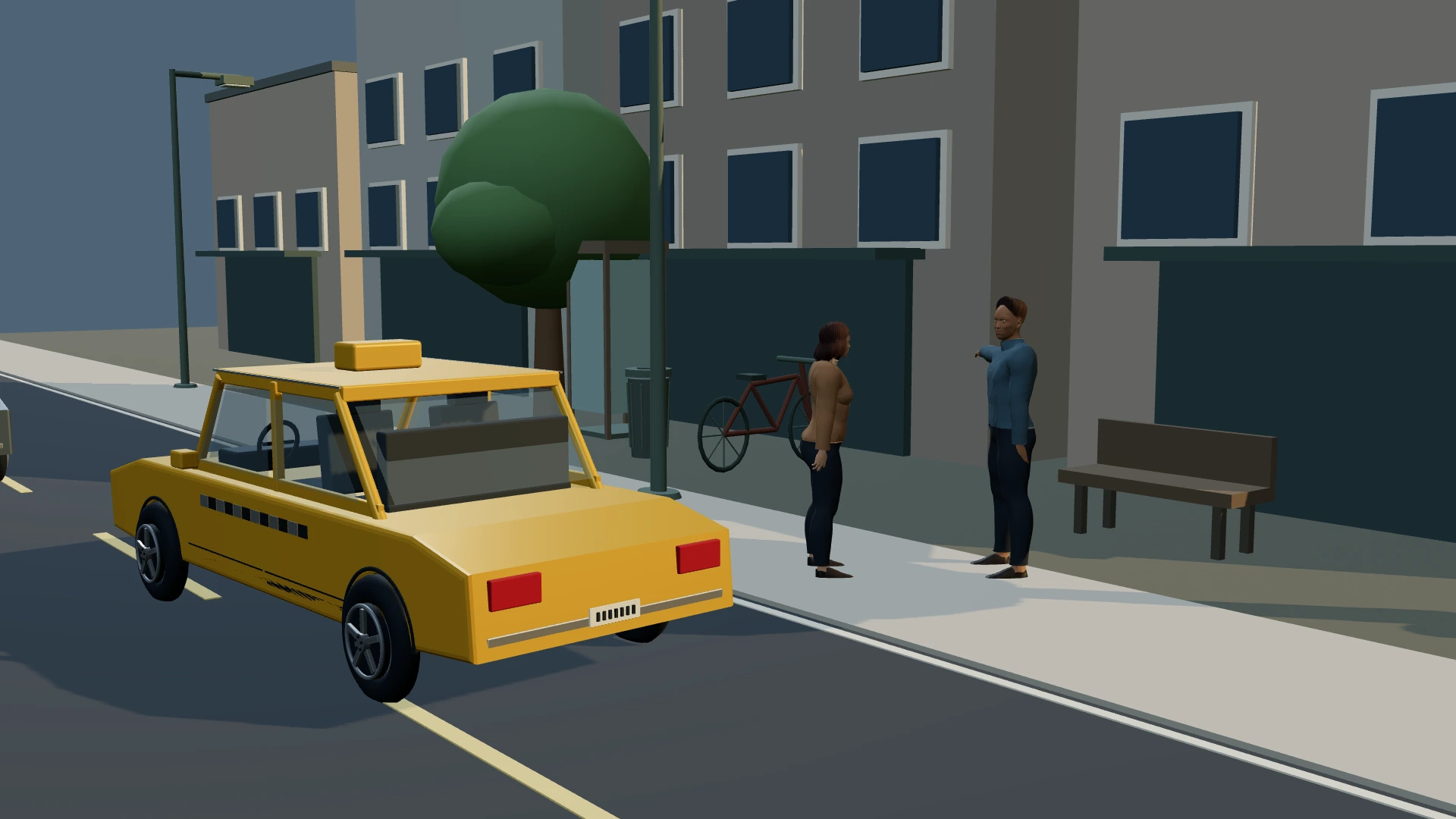
- Reusable 3D sets
- Posed cast & camera coverage
- Writing in the same project
The short version
The useful distinction.
Page & Frame is aimed at writers and filmmakers who want writing, local set design and manual camera planning together. Previs Pro is a specialized previs tool with a broader animation and review workflow. Check the differences below before switching; Page & Frame does not claim AR, motion capture, full animated-camera or NLE-export parity.
A practical comparison
Choose by the coverage you need.
On a smaller screen, scroll the table sideways to compare the details.
| Your decision | Page & Frame | Previs Pro |
|---|---|---|
| Writing and planning | Native screenplay editor with scene-linked 3D coverage | Dedicated previs workflow with screenplay import |
| 3D setup | Reusable sets, dressed locations, posed actors and cameras | 3D sets, characters, props and camera tools |
| Output | Storyboard PDFs, 4/6/8-shot visual lists, silent saved-frame WebM animatics | PDF/images, animated sequences, MP4 and NLE export documented |
| Advanced production needs | AR, motion-capture and full camera-animation parity not claimed | AR, PoseCap, timeline audio and review tools documented |
| US pricing checked Nov 6, 2026 | Announced $69.99 launch / $99.99 regular, plus tax | Free mode with limits; $39.99/month, $119.99/year or $359.99 lifetime |
| Initial platform | Apple Silicon Mac/macOS 13+; public launch in preparation | Mac, iPad and iPhone; see vendor requirements |
Competitor facts checked November 6, 2026 against the vendor’s published information; competitor applications were not tested for this comparison. Offers, features and terms can change. Page & Frame is pre-launch. Sources:
What are you trying to learn from the shot?
A storyboard is useful when it helps you make a filming decision. Perhaps the doorway hides a reaction, the parked car blocks a sightline or a wide lens puts an unwanted wall in the background. You do not need a finished film to discover those problems. You need a readable space, actors whose positions make sense and a camera you can place intentionally. That is the manual planning work Scene Stealer brings into Page & Frame, alongside the screenplay that gives each frame a purpose.
Start your comparison with a real scene, not a promise that any product can “do everything.” Does your next project need printable coverage, a moving-camera presentation, a director’s view on a phone or a shared review process? Those are different jobs. Page & Frame’s connected writing and staging approach may fit an independent writer-director, while a specialized tool may be the better fit for advanced previs delivery. This page is written by Page & Frame’s publisher; the vendor sources below explain the competitor features being compared.
A set should explain the action.
A usable location is more than a floor with objects on it. Its walls, doors, windows and changes of level help explain how people enter, where they can stand and what another character can see. Page & Frame includes custom set construction, built-in materials, photo textures, props and reusable saved locations. You can use a workshop set as a starting point, then adapt it to the scene. The aim is a space that supports blocking, rather than a decorative background disconnected from the action.
For example, in an office conversation the desk can separate the speakers while a third character waits by the entrance. Build that relationship into the set before choosing close-ups. Check that the camera can see through the intended doorway and that props do not intersect the actors. Reusing the set gives later coverage a consistent reference. Photo textures are manually mapped references; they are not a promise that a single photograph will automatically reconstruct a complete, dimensionally accurate 3D location. The set-design feature page describes that distinction in more detail.
Block the cast before pressing Capture Shot.
Blocking establishes positions, direction and intention. Add the characters you need, choose their appearance, set a readable pose and check the hands, feet and eyelines from the camera position. An expression can suggest a beat in the exchange, but the scene should still read at a wider scale through posture and distance. Treat the model as a staging reference. A detailed face is less useful than a clear relationship between the people in the frame.
Use the setup view to understand the space and the through-the-lens view to judge what the audience sees. Adjust the camera position, aim point, focal length and aspect ratio, then capture the shot deliberately. That makes a saved shot the result of a decision, rather than an automatic record created when you first select a location. Move in for a reaction or change the height to test a different emphasis. The saved frame, shot details and scene association can then be reviewed together in the shot list.
Plan coverage, rather than collecting unrelated pictures.
A sequence needs a visual argument. Begin with a frame that explains the geography. Add a closer angle for an important action and a reaction where the audience needs to see its effect. Check whether screen direction and eyelines remain understandable when you place the shots next to one another. A collection of attractive isolated images can still leave the editor without the information needed to connect the scene. The planning question is what each shot adds that the previous frame could not communicate.
In Page & Frame, the screenplay scene remains close to the coverage. A dialogue change can send you back to the same scene, rather than a separate document whose numbering has drifted. Each shot can carry a description, timing, movement and notes. That connection is the reason to compare this app with a specialized storyboard tool. It does not mean a printed board has checked continuity automatically or proved that the scene will cut perfectly. The writer and director still review what the sequence communicates, using the frames as a shared reference.
Make the handoff useful on the day.
A visual shot list gives the crew a frame to refer to, alongside the written intent. Page & Frame supports shot-list printing and PDF output with 4, 6 or 8 shots per page on Letter or A4, with notes space and Done/Reshoot checks. Fewer frames give each shot more room; denser pages are easier to carry when the images and descriptions remain legible. Choose the density for the person using the sheet, not simply for the smallest page count.
Storyboard PDF output is a different presentation, with 2, 4 or 6 frames per page. A silent WebM animatic can show the order and chosen duration of saved frames. That is useful for discussing the shape of a sequence, but it is not the same as animating a character or a camera through a 3D set. If you need synchronized dialogue, complex timeline audio, MP4 delivery or an NLE handoff, check those requirements explicitly. Page & Frame does not advertise those advanced outputs as completed launch features.
Compare licenses as carefully as features.
Page & Frame’s planned purchase is US$69.99 at launch, with a planned US$99.99 regular price, plus applicable tax. It covers one computer, lifetime use of the purchased major version and updates to that version; future major upgrades may cost extra. Core writing and manual staging work offline. Public checkout and downloads are not open yet, and the first release is being prepared for Apple Silicon Mac with macOS 13 or later. Windows and Intel Mac are not initial launch downloads.
Price should be considered alongside availability and scope. Previs Pro also documents a free mode, so Page & Frame is not being presented as the cheapest possible way to begin storyboarding. Nor should a planned purchased-major license be described as identical to another product’s lifetime plan. Optional AI image generation in Page & Frame uses your own provider account, with separate provider costs and connected processing when requested. You can evaluate the manual workflow without needing to make AI generation the foundation of your storyboard process.
Run a small, demanding comparison.
Use a scene with an entrance, two people speaking and one practical obstruction, such as a desk or car. Build the basic space, place the actors and establish a wide shot. Capture an opposing angle and a close reaction. Save and reopen the project, then check that the staging and saved coverage remain understandable. Print the three shots or arrange them as a storyboard. Ask whether a collaborator can identify the geography, the moment of change and the reason for each camera position.
If your work depends on an advanced feature, include it in the trial rather than inferring it from a similar-looking screenshot. A camera frame does not establish AR support; a posed actor does not establish motion capture; a saved-frame preview does not establish a full animation timeline. Page & Frame is worth considering when the writing-to-coverage connection helps your work. Keep the specialist option on your list when its particular tools are essential. Our dialogue-storyboarding guide shows a practical way to judge a small coverage sequence, and the free shot-list worksheet is available to use now.
Is Scene Stealer a standalone app?
Scene Stealer is the integrated 3D set-design, staging and shot-planning workspace inside Page & Frame. It shares the screenplay project and saved scene/shot relationships. You do not need to maintain a second copy of the script to plan its visual coverage.
Before you decide
A few useful answers.
Can I make storyboards without drawing?
The manual workflow uses 3D actors, props, locations and a camera to create saved frame references. You can also import images. It is designed to help communicate staging and composition, rather than requiring polished illustration skills.
Does Page & Frame include an AI subscription?
No AI subscription or credits are included. Core manual tools work offline. Optional generation uses your own provider account; check provider costs and data handling before using that connected workflow.
Does it have every Previs Pro feature?
No. Full animated-camera, AR, motion-capture, audio-timeline, MP4 and NLE-export parity are not claimed. Compare the actual workflow and required outputs rather than assuming identical feature sets.
Can I use it on an iPad or Windows computer?
The first release is being prepared for Apple Silicon Mac/macOS 13+. Windows, Intel Mac and mobile downloads are not offered at launch. Follow the launch list for platform updates.
Keep a seat at the table
The next chapter.
In your inbox.
Get Page & Frame beta and launch news from Level Up Classroom Inc.
Apple Silicon Mac first. Windows is planned. Joining is free; it does not reserve a purchase or guarantee beta access.
The whole creative workspace
Write it. Build it.
See it.
Page & Frame brings screenplay writing, story planning, reusable 3D sets and visual shot planning together.
US$69.99 launch · US$99.99 planned regular · plus applicable tax
Planned one-time purchase for one computer. Lifetime use of the purchased major version and its updates; future major upgrades may cost extra. Apple Silicon Mac/macOS 13+ first. Windows and Intel Mac downloads are not offered at launch.
Join the launch list ↗